Choose whether pyorbiter returns pandas or polars DataFrames, and what changes between the two.
A simulation in pyorbiter is a table: one row per body per time step. By default that table is a pandas DataFrame. If you prefer polars, pyorbiter can return polars DataFrames instead, and every function that takes a simulation accepts either kind.
This article covers how to choose, what stays the same, and the one place where the two differ: how the settings of a run travel with its result.
Installation
pandas is installed with pyorbiter. polars is optional and comes with the polars extra:
The setting lasts for the rest of the Python session. Switch back the same way:
orb.set_backend("pandas")orb.get_backend()
'pandas'
The rest of this article leaves the default at pandas and uses backend="polars" where a polars result is wanted.
Only "pandas" and "polars" are accepted. Anything else raises a ValueError, and asking for polars when it is not installed raises an ImportError that names the extra to install. In both cases the default is left as it was.
Functions return the kind they are given
The backend setting only matters for the functions that create a DataFrame from a system: simulate(), simulate_system(), get_bodies(), and the bodies property. Every function that is given a simulation ignores the setting and hands back the same kind it received. That covers the analysis functions and continue_simulation().
Thirty more days for three bodies adds 90 rows, and the result is still polars.
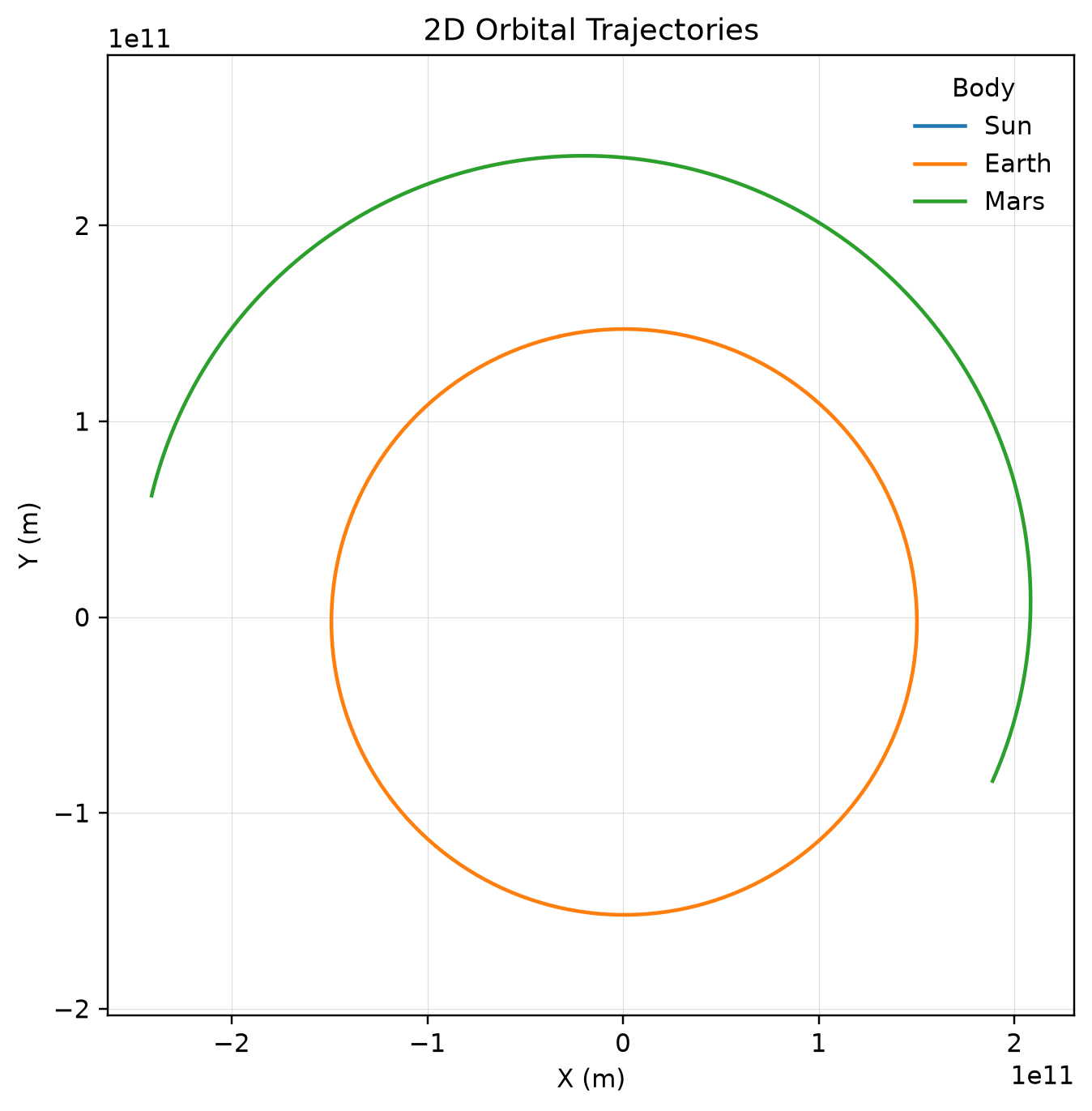
The plotting functions accept either kind too. They draw the same picture from both:
orb.plot_orbits(sim_pl, three_d=False);
LazyFrames
A polars LazyFrame is accepted wherever a polars DataFrame is. pyorbiter collects it, does the work, and returns an ordinary polars DataFrame, not another LazyFrame:
This lets a lazy query end in a pyorbiter call without an explicit .collect(). Here the query keeps the first 100 days before the reference frame is shifted:
A simulation often picks up extra columns as you work: a time in days, a label, a flag. pyorbiter only computes with its own nine columns (id, mass, x, y, z, vx, vy, vz, time). Functions that return the rows of a simulation, such as shift_reference_frame(), leave any other column exactly as it was.
The day and kind columns come back untouched, with their polars types, in their original positions. The same is true for a pandas simulation.
Two details are worth knowing:
continue_simulation() adds new rows, and it has no way to know what your columns should hold for them. They are filled with nulls in polars, and with NaN in pandas.
Functions that build a new table, such as get_energy() or get_orbital_elements(), return only their own columns. Your extra columns do not get in their way, but they are not part of the result.
more = orb.continue_simulation(labelled, time_step=orb.seconds_per_day, duration=orb.seconds_per_day)more.select("id", "time", "day", "kind").tail(4)
shape: (4, 4)
id
time
day
kind
str
f64
f64
str
"Mars"
3.1536e7
365.0
"planet"
"Sun"
3.16224e7
null
null
"Earth"
3.16224e7
null
null
"Mars"
3.16224e7
null
null
Run settings
simulate() records four settings alongside its result: the gravitational constant G, the softening length, the integrator, and the time step. The analysis functions read them back, so that get_energy(), for example, uses the same G and softening as the run did, and continue_simulation() carries on with the same integrator.
run_settings() returns them as a dict. It works the same way for both kinds of DataFrame:
Where the settings are kept is the real difference between the two backends.
pandas: settings live in attrs
A pandas DataFrame has an attrs dict for exactly this kind of metadata, and run_settings() returns a copy of it. pandas carries attrs along through most operations, so a simulation you have filtered or added columns to still knows its settings:
A polars DataFrame has no attrs. pyorbiter instead remembers the settings for the exact DataFrame it returned. A DataFrame you derive from it is a new object, and nothing is remembered for it:
filter, sort, with_columns, select, clone, a join, and a file you read back all give a new DataFrame with an empty dict. DataFrames returned by shift_reference_frame() and continue_simulation() are the exception. pyorbiter made them, so it records the settings for them:
When a function finds no recorded settings, it falls back to the defaults: the standard G, no softening, and the "verlet" integrator. If the run used the defaults, the fallback gives the same values and nothing goes wrong. Most runs are like this, including every simulation above.
It matters when the run used something else. Here is an Earth-Moon run with a softening length of 50,000 km and the Euler-Cromer integrator:
recent holds correct positions and velocities, but it has lost the settings. Asking for its energy now uses a softening of zero, which is not what the run used. Compare the potential energy at the last time step, computed three ways:
The derived DataFrame gives \(-7.396 \times 10^{28}\) J where the run’s own softened potential is \(-7.337 \times 10^{28}\) J, a difference of about 0.8 percent. Nothing warns you, because a softening of zero is a perfectly valid setting. Passing softening=5e7 yourself restores the right answer.
continue_simulation() is affected in the same way, and there the integrator matters as well. Continue for 10 more days from each DataFrame and compare where the Moon ends up:
Continued with the default settings, the Moon ends up about 23,600 km from where the original run puts it. With softening and method passed explicitly, the continuation matches the original exactly. The settings recorded for each result show what was used:
The rule for polars is short. If a run did not use the default G, softening, and integrator, and you have derived a new DataFrame from its result, then:
pass G and softening to get_energy() and conserved_quantities(),
pass G to get_orbital_elements(),
pass G, softening, and method to continue_simulation().
A custom G comes from orb.create_system(G=...). Softening and the integrator come from simulate(). Another way to stay safe is to call the pyorbiter function on the original DataFrame first and do your own filtering on what it returns.
With pandas the same filter keeps the settings, so none of this is needed:
To finish, here is one small analysis written twice. The question: over one year, how close does each planet come to the Sun, how far away does it get, and what is its mean speed?
The steps are the same in both libraries. Shift the frame to the Sun, compute a distance and a speed for every row, then summarize per body.
The two tables agree. Earth ranges from \(1.471 \times 10^{11}\) m to \(1.521 \times 10^{11}\) m from the Sun, its perihelion and aphelion distances, and averages about 29.8 km/s. Mars ranges from \(2.066 \times 10^{11}\) m to \(2.492 \times 10^{11}\) m and averages about 24.0 km/s over this year, which is a little more than half of its 687-day orbit.
Two small differences in idiom are visible. pandas puts the body names in the index of the summary, while polars keeps id as an ordinary column. And sort=False in pandas plays the role of maintain_order=True in polars: both keep the bodies in the order they were added.
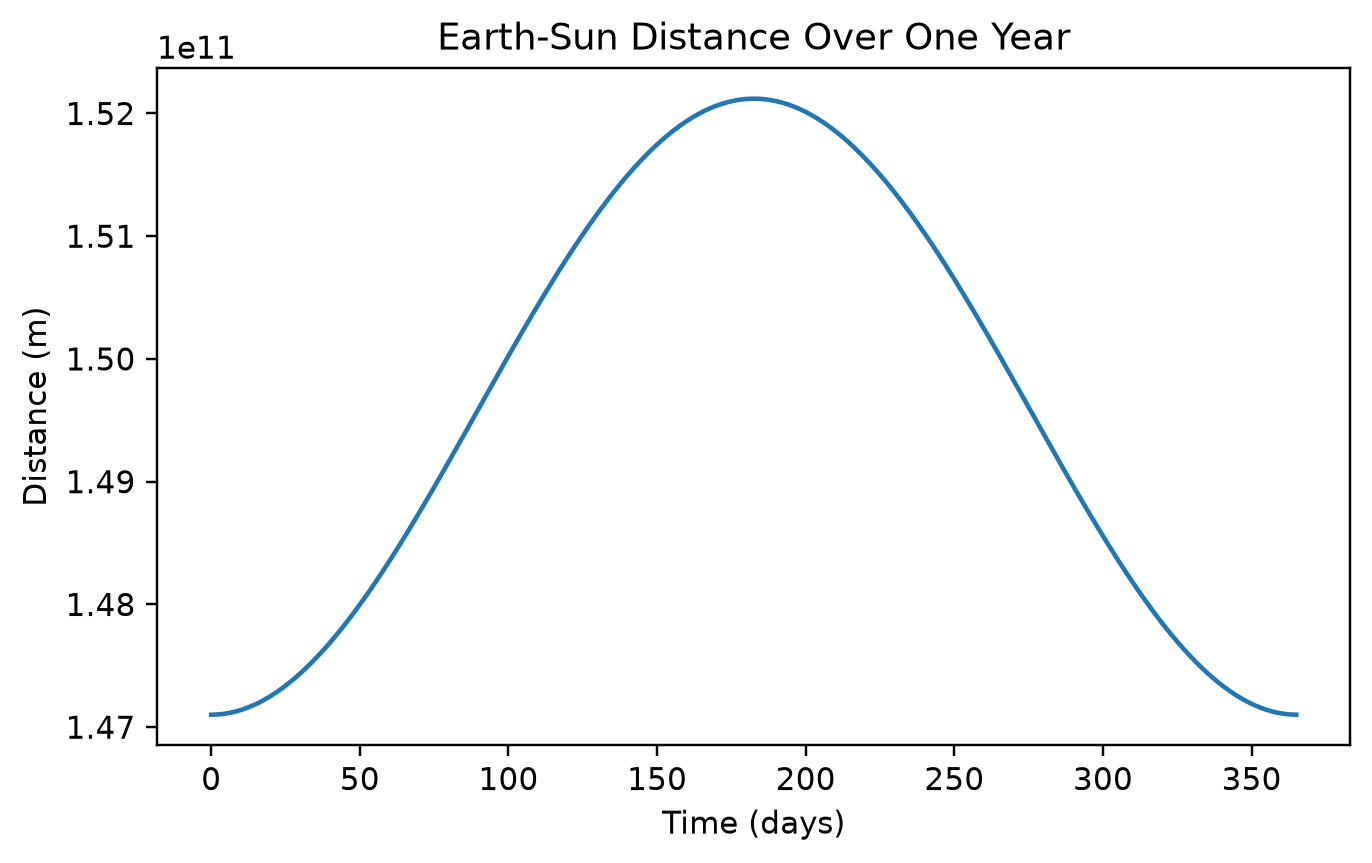
Plotting a column over time looks much the same in either library, because matplotlib accepts both kinds of column. Here is the Earth-Sun distance through the year from the polars result:
import matplotlib.pyplot as pltearth = ( orb.shift_reference_frame(sim_pl, "Sun") .filter(pl.col("id") =="Earth") .with_columns( day=pl.col("time") / orb.seconds_per_day, r=(pl.col("x")**2+ pl.col("y")**2+ pl.col("z")**2).sqrt(), ))fig, ax = plt.subplots(figsize=(7, 4))ax.plot(earth["day"], earth["r"])ax.set_xlabel("Time (days)")ax.set_ylabel("Distance (m)")ax.set_title("Earth-Sun Distance Over One Year");
Earth starts at perihelion, because add_planet() places a body at periapsis by default, reaches aphelion half a year later, and returns.
Which one to use
Use whichever library you already know. pyorbiter gives the same numbers either way.
The simulation itself is not affected by the choice. The engine computes with numpy and pandas internally and converts at the boundary of the package, so asking for polars does not change how the integration runs. What changes is the library you use afterwards for your own filtering, grouping, and joining.
pandas is the default and needs nothing extra. Its attrs keep the run settings attached through your own operations. polars is a good choice if the rest of your work is already in polars. Keep the note about run settings in mind for runs with a custom G, softening, or integrator.